
New Functionality Added
This update added the following features for Content Creators:
- Renaming of Documents - We have added the ability for Content Creator users to rename documents from within the Available Documents grid on the Transaction Details screen. By default when a document is first generated, it's name changes from the name of the document type to the name of the Transaction plus the name of the document type (for example: "ABC Corp - Leasing Agreement.docx"). User can now rename the document to any name they wish. The ability to rename documents is a permission which by default is given to any User within the Transaction Creator - Admin Role. Administrators can modify this to allow this permission for any Role they wish, include custom Roles.
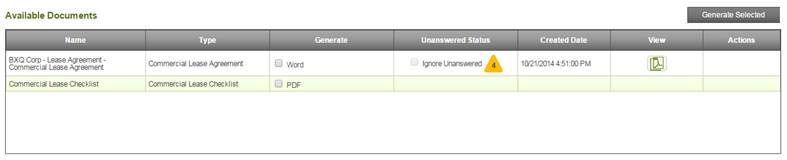
In order for the rename functionality to be added, we have modified the columns fo the available documents grid as follows:
- Name Column - No change.
- Type - New column that has replaced the Template(Version) column. This new column displays the type of document. The Template(Version) column will be added back in the Document Versions grid which will be released within the next two weeks.
- Generate Column - No change
- Unanswered Status Column - No Change.
- Created Date Column - New column that displays the date and time at which the document was generated.
- View Column - No change.
- Actions Column - New column that displays available actions for documents. The new document renaming feature is the first of two features to appear in this new column. In the next three weeks, the ability to view document versions will also appear in this column.
The Available Documents grid now appears as pictured below:
Comments
0 comments
Please sign in to leave a comment.